
M5 Apple Vision Pro vs. Steam Frame: The two headsets offer different takes on virtual reality.
The M5 Apple Vision Pro now has yet another rival, as VR headsets continue to pick up steam. Here’s how Apple’s headset compares to the newly announced Steam Frame.
Following the debut of the upgraded Apple Vision Pro with the M5 chip, October 2025 saw the release of a major competitor in the form of the Samsung Galaxy XR.
Now, the M5 Apple Vision Pro will have to compete with one more virtual reality headset, this one coming from video game maker Valve. The Steam Frame is arguably the second major VR hardware release from Valve, following the debut of the Valve Index back in 2019.
Relative to the Apple Vision Pro with the M5 chip, the Steam Frame offers an experience tailored to gamers and VR game enthusiasts. The headset is arguably closer to a game console than a wearable computer, in some aspects.
Still, both headsets have their similarities — both have 16GB of LPDDR5X RAM, 256GB and 1TB storage options, IPD adjustment options, and much more. Here’s how the M5 Apple Vision Pro stands against Valve’s all-new Steam Frame.
M5 Apple Vision Pro vs. Steam Frame: Technical Specifications
| Specifications | M5 Apple Vision Pro | Steam Frame |
|---|---|---|
| Starting Price (launch) | $3,499 | To be announced |
| Weight (ounces) | 26.4 – 28.2 | 15.5 with headstrap |
| Operating System | visionOS | SteamOS 3 (Arch-based) KDE Plasma for desktop use |
| Processing hardware | M5 10-core CPU 10-core GPU 16-core Neural Engine Neural Accelerators Hardware-accelerated ray tracing |
Snapdragon 8 Gen 3 8-core CPU Qualcomm Adreno 750 GPU Qualcomm Hexagon NPU |
| RAM | 16GB LPDDR5X | 16GB LPDDR5X |
| Display type | Dual Micro-OLED 23 million pixels 7.5-micron pixel pitch 92% DCI-P3 coverage Refresh rates up to 120Hz cca. 100-degree horizontal FOV 3D display system |
LCD 72-144Hz refresh rate (144Hz experimental) FOV up to 110 degrees |
| Resolution | cca. 3,660 x 3,200 pixels per eye | 2,160 x 2,160 pixels per eye |
| IPD | Adjustable – 51mm to 75mm | Adjustable – 60mm to 70mm |
| Biometrics | Optic ID | None | Connectivity | Wi-Fi 6 Bluetooth 5.3 |
Wi-Fi 7, 2×2 Includes separate Wi-Fi 6E wireless adapter Bluetooth 5.3 2.4Ghz dedicated link for Steam Frame Controllers |
| Cameras and Sensors | 2 high-resolution main cameras 6 world-facing tracking cameras 4 eye-tracking cameras TrueDepth camera LiDAR Scanner 4 inertial measurement units (IMUs) Flicker sensor Ambient light sensor |
4 outward-facing monochrome cameras for controller and headset tracking 2 interior cameras for eye tracking and foveated streaming IR illuminators |
| Audio Technology | Spatial Audio with dynamic head tracking Personalized Spatial Audio and audio ray tracing Six-mic array with directional beamforming H2 to H2 ultra-low-latency connection to select AirPods models |
Dual speaker drivers per ear, integrated into headstrap Dual microphone array |
| Storage | 256GB 512GB 1TB |
256GB 1TB microSD card slot |
| Expansion | None | User-accessible front expansion port Dual high-speed camera interface (8 lanes @ 2.5Gbps MIPI) / PCIe Gen 4 interface (1-lane) |
| Availability | Since October 2025 | Early 2026 |
M5 Apple Vision Pro vs. Steam Frame: Design, weight
Design-wise, the Apple Vision Pro has remained unchanged since the debut of the M2 model in 2023. The Apple headset boasts a rounded look, consisting largely of aluminum and curved glass on the front.
M5 Apple Vision Pro vs. Steam Frame: The Steam Frame looks nothing like an Apple product. Image Credit: Valve/Steam
The appearance and round aesthetic of the Apple Vision Pro are somewhat reminiscent of the AirPods Max. The use of aluminum echoes Apple’s unibody MacBook Pros, which were similarly only available in silver. In short, the Apple Vision Pro is unmistakably an Apple product.
Valve’s Steam Frame, meanwhile, looks unique in its own right. The company opted to use black as the main color of the device, which ultimately sets it apart from the Apple Vision Pro and Samsung Galaxy XR. The Steam Frame doesn’t feel like a product that was merely made to rival existing VR headsets, though it doesn’t necessarily resemble a premium product either.
In terms of comfort, Apple’s approach involved extensive research, as pre-release designs for the Apple Vision Pro were bundled with detailed 3D models of different head types. The new Dual Knit headband for the Apple Vision Pro also serves as an indication of Apple’s commitment to user comfort.
On the Apple Vision Pro, the upper and lower straps of the Dual Knit band can be adjusted independently, using the dual-function Fit dial on the side of the headband. This enables precise adjustments for a more comfortable, personalized fit on the Apple Vision Pro.
Apple says both straps are 3D-knitted as single pieces, which enables stretching and breathability. The lower band also features tungsten inserts, which serve as counterweights for added balance.
Valve, meanwhile, similarly emphasizes that the Steam Frame was “designed for comfort.” The company’s headset is also described as having its “weight balanced front-to-rear for a comfortable experience,” with the Steam Frame also featuring “no wires and no setup.”
Valve’s latter statement is vague, given that Steam Frame promotional material clearly shows a wire as part of the right side of the headset. The Steam Frame also features an expansion port on the underside of the headset, where users will be able to plug in cameras and the like.
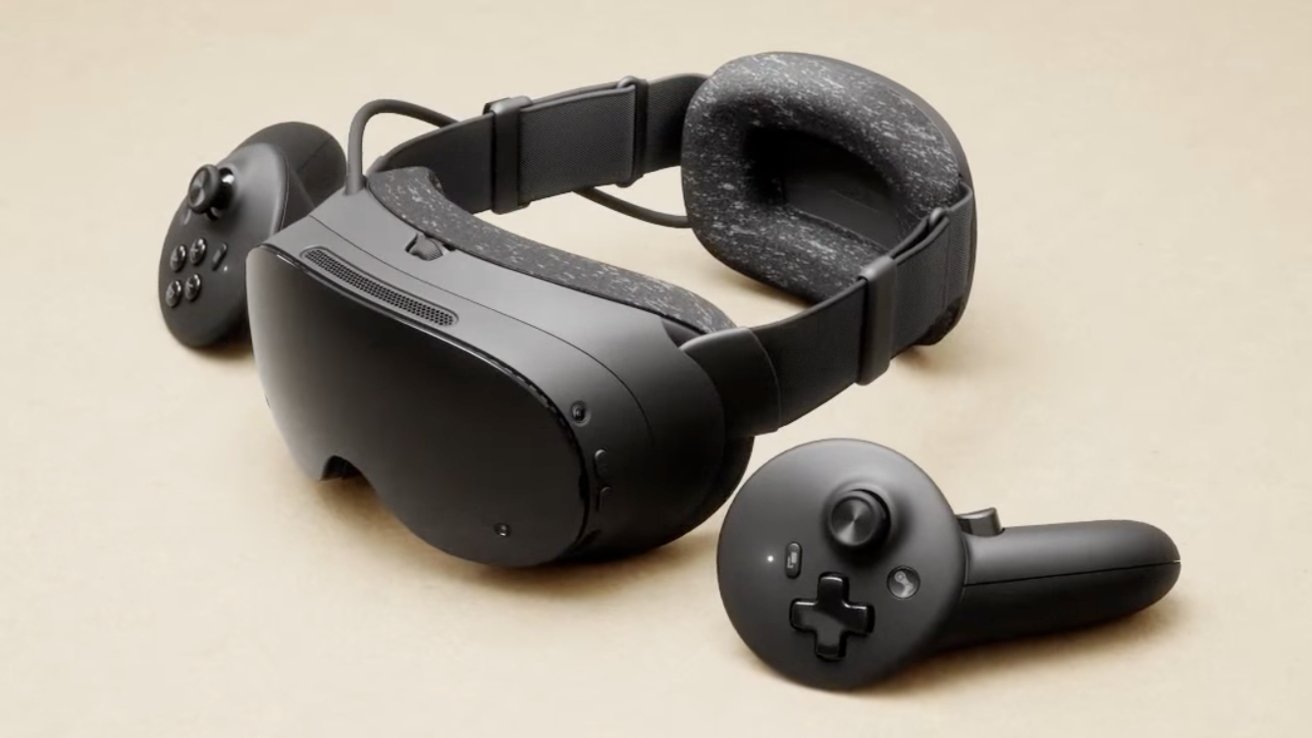
M5 Apple Vision Pro vs. Steam Frame: Valve made dedicated controllers for the Steam Frame. Image Credit: Valve/Steam
You’re not required to use the expansion port, and the wire on the headset itself is most likely not user-oriented, but both of those things do exist regardless.
While the Apple Vision Pro ships with the Dual Knit band, which can also be swapped for the Solo Knit band, the Steam Frame comes with a modular headstrap. According to the Steam Frame website, the modular headstrap is removable, allowing for other headstrap solutions. The strap also includes integrated dual audio drivers as well as a rechargeable battery.
Visually, the modular headstrap of the Steam Frame appears less complex than the Dual Knit or Solo Knit bands for the Apple Vision Pro. It’s hard to believe the strap of the Valve headset will be able to deliver the same level of comfort as the Apple Vision Pro bands. Still, it’s somewhat difficult to ascertain which one is better, given that the Steam Frame will only be released to the public in early 2026.
Even so, Valve’s Steam Frame has an edge over the M5 Apple Vision Pro in one area — weight.
The M5 Apple Vision Pro can weigh anywhere from 26.4 to 28.2 ounces, depending on the band and Light Seal used. The Steam Frame, meanwhile, weighs only 15.5 ounces with the included modular strap.
In practice, this means Valve’s headset is 10.9 ounces lighter than the M5 Apple Vision Pro. While this may not sound like much, a lighter device may put less strain on the wearer’s head, allowing for a better experience.
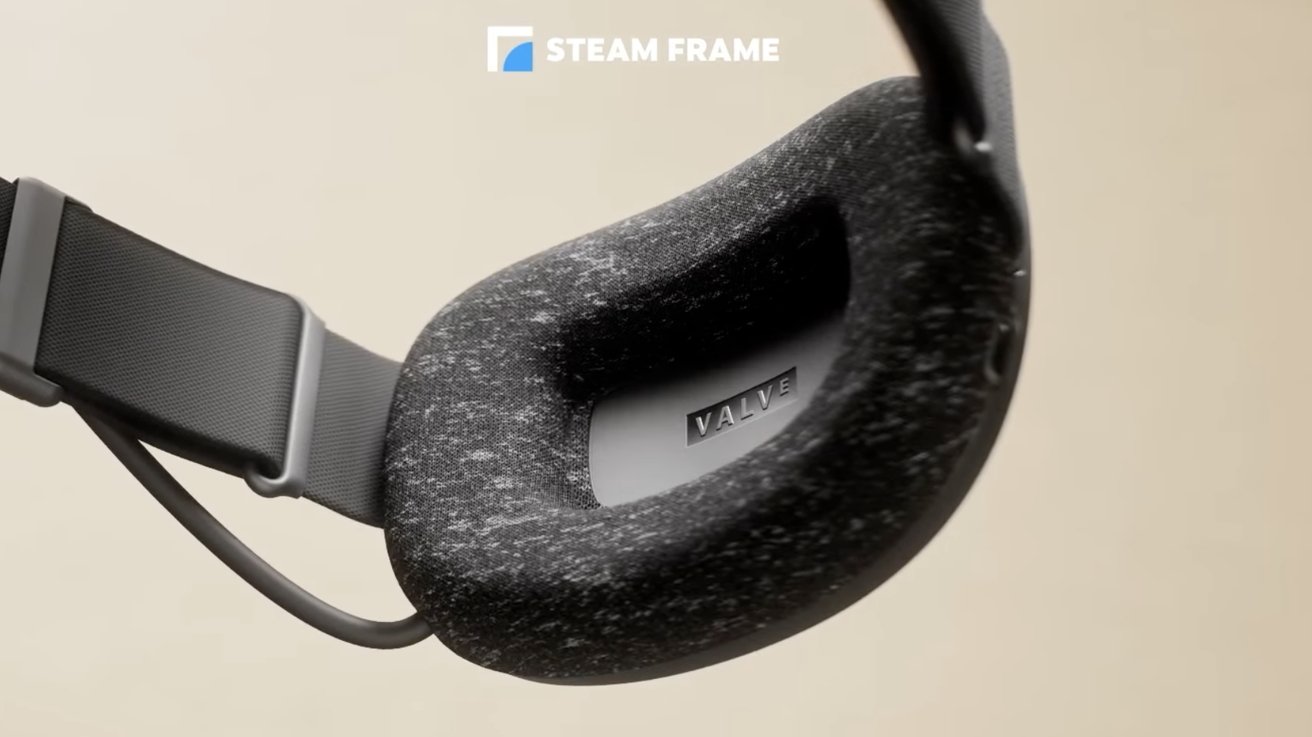
M5 Apple Vision Pro vs. Steam Frame: The Steam Frame comes with a modular head strap. Image Credit: Valve/Steam
The difference in weight is to be expected, given that the M5 Apple Vision Pro and the Steam Frame are meant for two almost completely different demographics.
M5 Apple Vision Pro vs. Steam Frame: Target audience
The Apple Vision Pro remains an “early adopter product,” as Apple CEO Tim Cook put it. What that means is that it’s a headset for those who want the technology of the future, today. Of course, that statement was made when “spatial computing” was regarded as the future more so than artificial intelligence is today.

M5 Apple Vision Pro vs. Steam Frame: Valve has made a headset primarily geared toward gamers. Image Credit: Valve/Steam
Other manufacturers, like Samsung, have tried to merge the two concepts, with the Samsung Galaxy XR being marketed as some sort of “AI-first” headset. The company tried to capitalize on the recent artificial intelligence craze, with Samsung’s product demo making even Apple Intelligence appear dated.
That said, both Apple and Samsung have tried to market their products as devices that would appeal to all sorts of groups. Potential customers included anyone from “spatial computing” enthusiasts and designers, all the way to enterprise users in various industries, including healthcare.
The Steam Frame embodies a more decisive, if limited, approach, as Valve only had one target audience in mind — gamers.
Valve’s headset isn’t a product built on buzzwords, meant to appeal to those with money to burn and too much time on their hands. The Steam Frame doesn’t rely heavily on the capabilities of Google Gemini or similar AI assistants, either, as its product page contains no mention of artificial intelligence.
Instead, the Steam Frame is meant to be a gaming and game streaming device, first and foremost. To be more specific, Valve’s headset is marketed as one that can handle both VR and non-VR titles from the extensive Steam catalog. This ultimately makes sense, given that Valve is predominantly known for its games, including the iconic Half-Life and Portal franchises.
Valve emphasizes that the Steam Frame is primarily meant to stream games from your PC, though the headset itself is also capable of loading standalone games. The Steam Frame runs SteamOS 3, which is an Arch-based operating system — essentially a version of Linux. This means the Valve headset effectively offers a full desktop environment, letting you do anything a PC running Arch Linux would be able to handle.
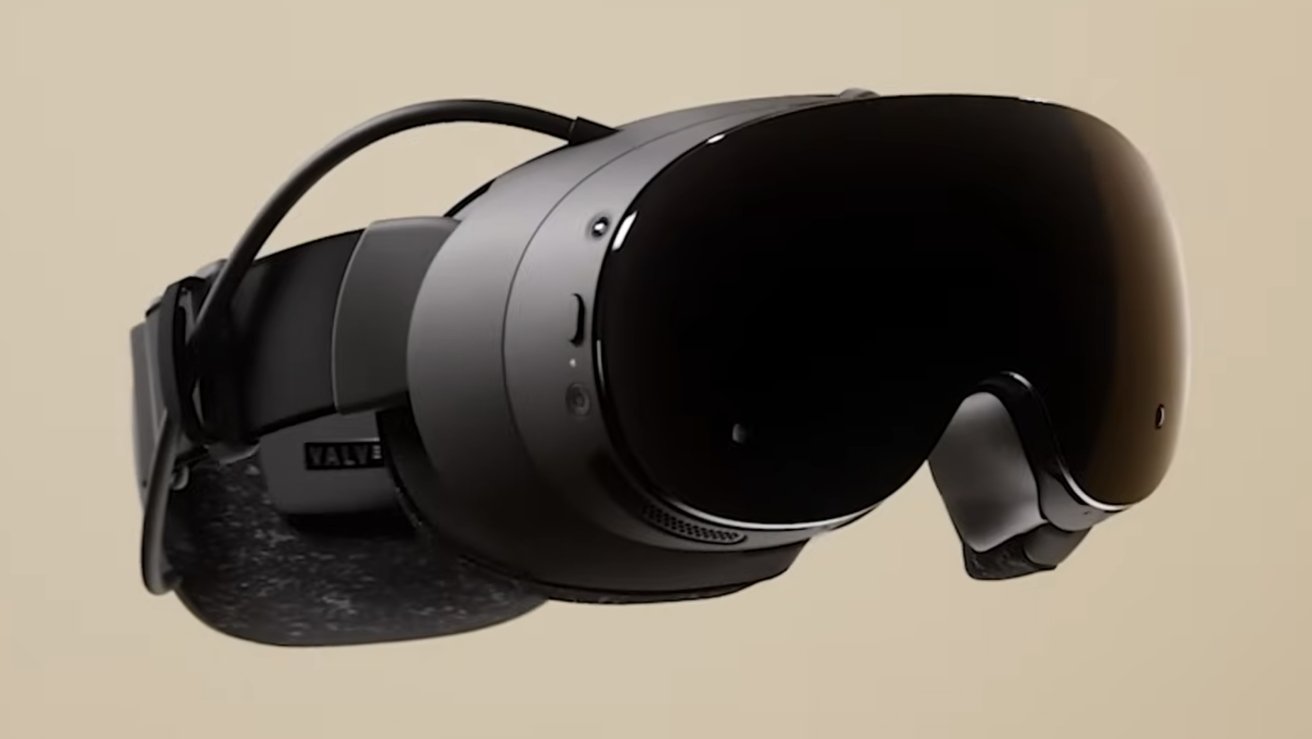
M5 Apple Vision Pro vs. Steam Frame: The Steam Frame is more akin to a wearable console than a true computer. Image Credit: Valve/Steam
Relative to the M5 variant of the Apple Vision Pro, the approach of the Steam Frame sounds great, in theory. The execution, however, leaves much to be desired.
For starters, the M5 Apple Vision Pro also supports game streaming via the Mac Virtual Display feature. This effectively lets you use the Apple Vision Pro as a widescreen display, and it works with triple-A games the likes of Resident Evil: Village.
With virtual machine software, like Parallels Desktop, for instance, you can play Windows games on Mac and view them on your Apple Vision Pro. This would also let you access Steam games meant for PC, which offers substantially more triple-A titles compared to the Mac App Store.
The reality is that games will look better on the M5 Apple Vision Pro compared to Valve’s Steam Frame, and part of it has to do with the difference in displays.
M5 Apple Vision Pro vs. Steam Frame: Displays
The Apple Vision Pro is equipped with a dual Micro-OLED display setup, with resolutions that allocate a high number of pixels per eye.
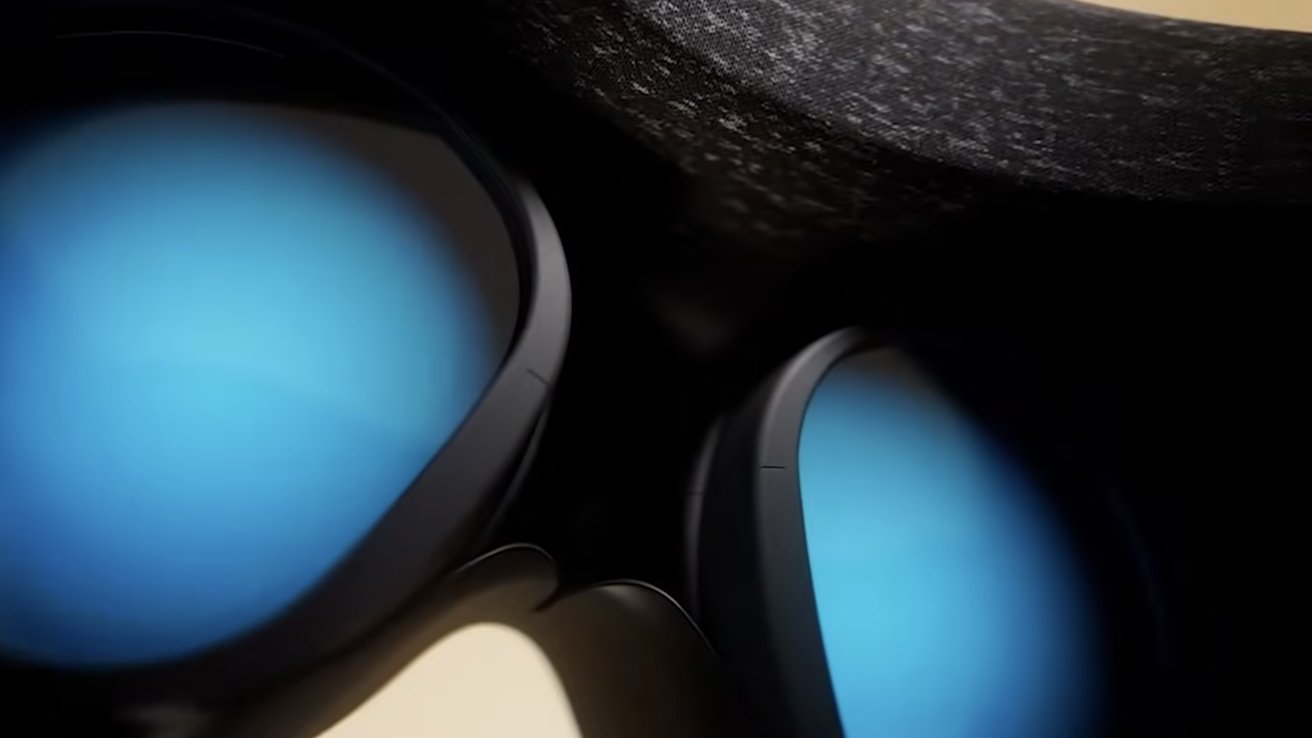
M5 Apple Vision Pro vs. Steam Frame: The Apple Vision Pro has a better display. Image Credit: Valve/Steam
To be more specific, the M5 Apple Vision Pro display setup offers roughly 3,660 by 3,200 pixels per eye. Meanwhile, the Steam Frame only delivers 2,160 by 2,160 pixels via its LCD panels. This means the Apple Vision Pro display has a total of 23 million pixels, whereas the Steam Frame display system only has around 9.33 million pixels in total.
In essence, the display resolution of the M5 Apple Vision Pro is higher than that of the Steam Frame. This allows for better and sharper image quality on the Apple Vision Pro, meaning you won’t be able to easily see individual pixels on the Apple headset. Apple says the M5 Apple Vision Pro has “more pixels than a 4K TV for each eye,” and the Steam Frame won’t be able to match that effect.
Apple’s use of microOLED panels for its headset also facilitates better color accuracy, relative to the LCD displays of Valve’s Steam Frame. You’ll notice the difference when looking at dark scenes in games, where black colors will usually appear blue-ish on LCD screens, but not on OLED ones.
The M5 Apple Vision Pro supports a wide color gamut with 92% DCI-P3 coverage, facilitating richer and more accurate color reproduction, relative to the Steam Frame.
Aside from the resolution and type, the M5 Apple Vision Pro and Steam Frame displays differ in another area — supported refresh rates.
The M5 Apple Vision Pro supports refresh rates of 90Hz, 96Hz, 100Hz, and 120Hz. On the M5 Apple Vision Pro, the 120Hz refresh rate allows for reduced motion blur when wearers are actively viewing their physical surroundings, according to Apple. The 120Hz refresh rate should also facilitate a smoother experience using the Mac Virtual Display feature.
The Steam Frame display setup, meanwhile, supports refresh rates ranging from 72Hz to 144Hz. This actually means the Steam Frame supports a refresh rate higher than the ones available on the M5 Apple Vision Pro. The caveat here, though, is that Valve says the 144Hz refresh rate is “experimental,” at least for the time being.
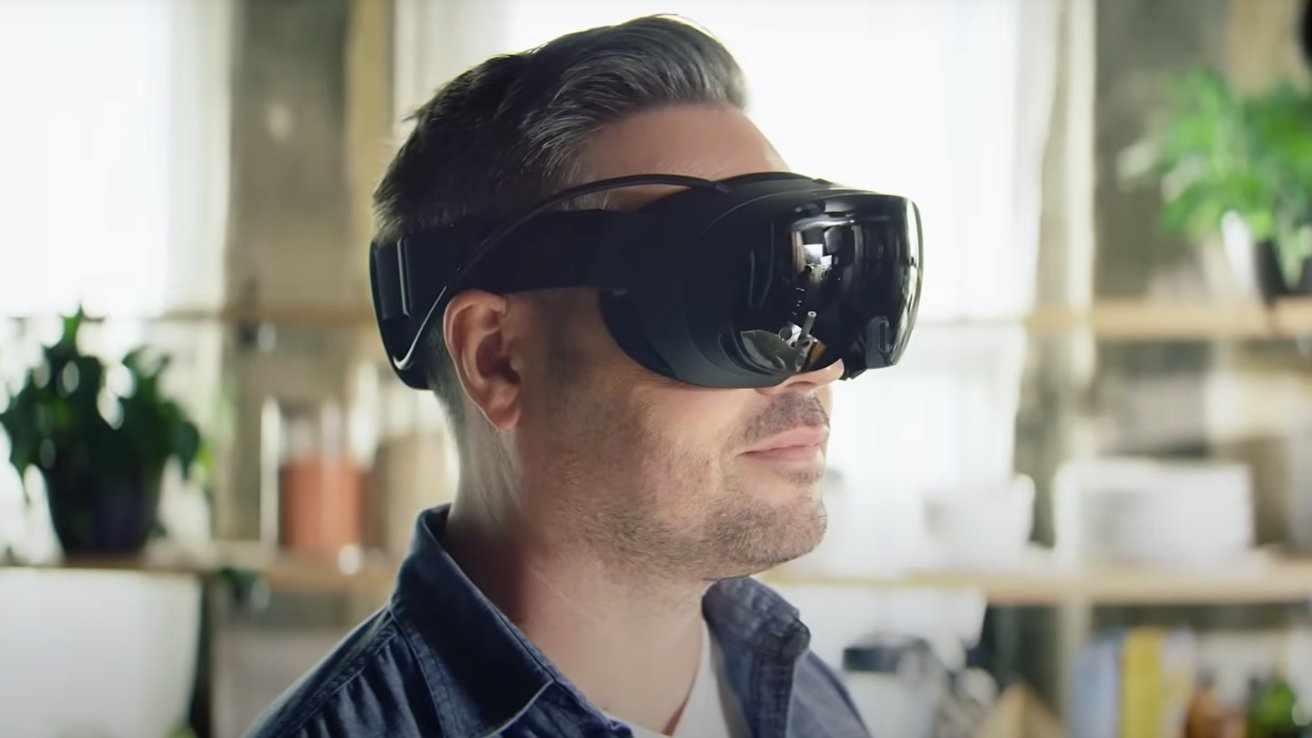
M5 Apple Vision Pro vs. Steam Frame: The Steam Frame supports refresh rates up to 144Hz. Image Credit: Valve/Steam
The lowest setting for the Steam Frame display system is 72Hz. This is only slightly better than the 60Hz refresh rate commonly found on lower-tier Apple products, like the MacBook Air or iPad Air.
The significantly lower refresh rates of Valve’s headset displays suggest the processing power isn’t there. Benchmark results for the Apple M5 chip and the Snapdragon 8 Gen 3 indicate the M5 is indeed much more powerful.
Because of this, the Steam Frame will likely push hard on foveated rendering and operate at much lower than native display resolution. The Steam Frame product page emphasizes that the headset uses foveated streaming. The feature “optimizes detail where your eyes are looking, and typically offers over a 10x improvement in image quality and effective bandwidth.”
Also listed on the Steam Frame page is the horizontal device’s field of view, which is described as being “large” at 110 degrees. At the time of writing, Valve has not yet revealed any details about the Steam Frame’s vertical field of view.
The M5 Apple Vision Pro, meanwhile, only offers a horizontal FOV of approximately 100 degrees, as suggested in an Apple developer session. The vertical FOV of the Apple Vision Pro has never been disclosed either.

M5 Apple Vision Pro vs. Steam Frame: The Steam Frame should still be great for games, despite its display. Image Credit: Valve/Steam.
Field of view is an essential metric in the virtual and augmented reality headset world. It defines the extent of a user’s visual perception within a headset, specifying how much of the virtual or augmented environment they can see. A wider FOV provides a more immersive experience by extending a person’s peripheral vision.
Additionally, both the M5 Apple Vision Pro and Steam Frame offer adjustable Interpupillary Distance (IPD) settings. IPD represents the measurement between the centers of the pupils of the eyes. It’s necessary for aligning visuals in headsets for optimal clarity and comfort.
The IPD adjustment on the M5 Apple Vision Pro ranges from 51mm to 75mm, accommodating a wide variety of users. Meanwhile, Valve’s Steam Frame features a relatively similar IPD range of 60mm to 70mm.
Overall, Apple’s headset is equipped with noticeably better displays compared to the Steam Frame, and the same is true for the camera system.
M5 Apple Vision Pro vs. Steam Frame: Cameras and sensors
The M5 Apple Vision Pro boasts 12 cameras, five sensors, and six microphones. Input from these sensors is processed exclusively by the R1 coprocessor chip, leaving the M5 open for all application processing tasks.
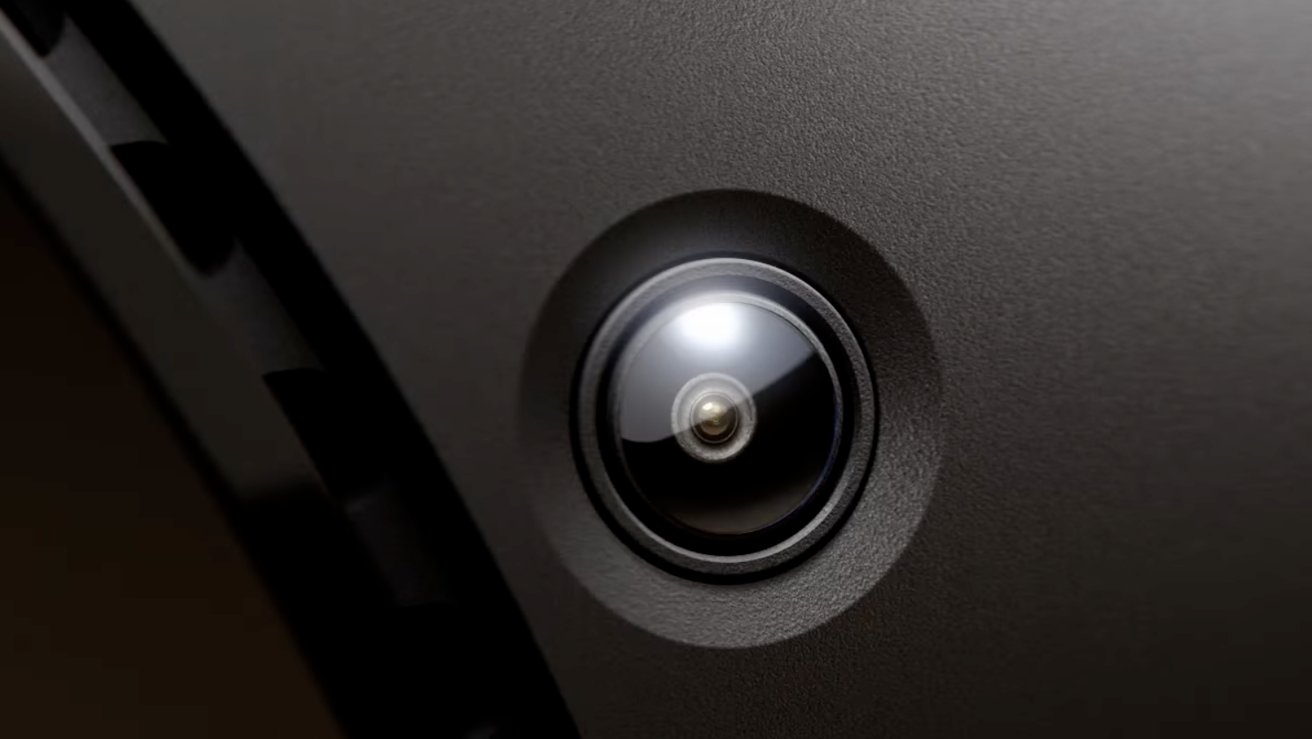
M5 Apple Vision Pro vs. Steam Frame: The Steam Frame offers fewer cameras than the Apple Vision Pro. Image Credit: Valve/Steam
Specifically, the M5 variant of the Apple Vision Pro features 2 high-resolution main cameras, 6 world-facing tracking cameras, 4 eye-tracking cameras, and one TrueDepth camera. There’s also a LiDAR Scanner, 4 inertial measurement units, along with a Flicker sensor and Ambient light sensor.
The Steam Frame, meanwhile, only offers 4 outward-facing monochrome cameras for controller and headset tracking, along with 2 interior cameras for eye tracking and foveated streaming. That’s half the cameras found on the Apple Vision Pro, though the Steam Frame does also have infrared illuminators for tracking and passthrough in dark environments.
Passthrough on Valve’s Steam Frame is monochrome, in other words — black and white. This ultimately delivers a passthrough experience that is significantly less immersive than that of the M5 Apple Vision Pro. It won’t be particularly impressive to see the world around you in grayscale, but it’s to be expected, given that the Steam Frame uses monochrome cameras for headset tracking.
The Stereoscopic 3D main camera system on the M5 Apple Vision Pro is capable of spatial photo and video capture. It has an 18 mm sensor with an f/2.00 aperture and 6.5 stereo megapixels.
Valve hasn’t provided any details regarding the Steam Frame Camera system beyond the number of cameras used, but don’t expect nearly the same level of image and video quality.
However, the Steam Frame does feature a user-accessible front expansion port on the bottom of the headset. This offers dual high-speed camera interfaces, with 8 lanes at 2.5Gbps MIPI, and a PCIe Gen 4 interface (1-lane). This port could be used to connect additional cameras, though no other details about it have yet been provided.
In terms of audio technology, the M5 Apple Vision Pro offers a six-mic array, with support for Personalized Spatial Audio and audio ray tracing. It also offers directional beam-forming and supports an H2 to H2 ultra-low-latency connection to select AirPods models.
The Steam Frame, meanwhile, only has a dual microphone array, with no mention of advanced audio recording capabilities.
Unsurprisingly, the M5 Apple Vision Pro has a more impressive camera system built-in, with more cameras, sensors, and microphones than the Steam Frame.
Whether or not the difference matters depends largely on your use case. If you were hoping for camera-related applications beyond gaming, then the Steam Frame won’t be ideal. For VR gamers, though, monochrome passthrough may be the most distracting aspect of the Steam Frame.
The Steam Frame does include some hardware advantages over the M5 Apple Vision Pro, though.
M5 Apple Vision Pro vs. Steam Frame: Controller support and connectivity
While the M5 Apple Vision only offers Wi-Fi 6, also known as 802.11ax, the Steam Frame supports the newer Wi-Fi 7 standard.
In short, Wi-Fi 7 compatibility means the Steam Frame can use multiple frequency bands, including 2.4 GHz, 5 GHz, and 6 GHz, simultaneously. This ultimately won’t make much of a difference to most users, though, as not everyone has a Wi-Fi 7-compatible router yet.
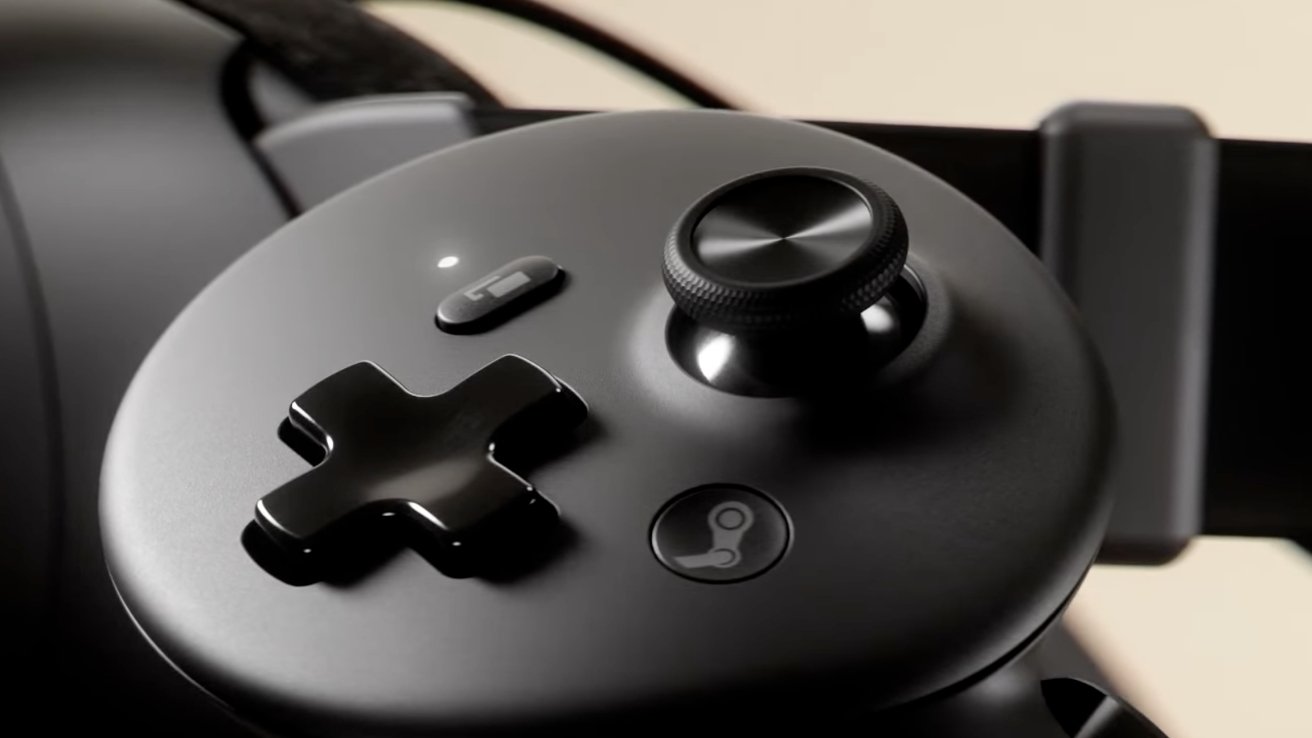
M5 Apple Vision Pro vs. Steam Frame: The Steam Frame controllers use a button layout already familiar to most gamers. Image Credit: Valve/Steam
The Steam Frame also ships with a wireless adapter included in the box. According to Valve, this adapter is meant to provide a direct, low-latency link between the headset and a PC, which will be useful for streaming games. The Steam Frame wireless adapter supports Wi-Fi 6E, which is still better than the Wi-Fi 6 of the Apple Vision Pro, though not by much.
Both the M5 Apple Vision Pro and Valve’s Steam Frame offer support for Bluetooth 5.3, meaning they can be used with Bluetooth accessories, including controllers. The M5 Apple Vision Pro is compatible with PSVR2 controllers, which are great for games, and can be used with the Mac Virtual Display feature.
On the M5 Apple Vision Pro, PlayStation VR2 (PSVR2) Sense controllers replace the functionality of your hand entirely. Hand tracking is turned off, so that users won’t accidentally click or tap with their hands.
PSVR2 controllers feature triggers which replace the pinch function when used on the Apple Vision Pro. Either joystick can be used to scroll. Pressing the PS button opens the Home View.
Few visionOS apps have actually utilized the full potential of PSVR2 controllers, though, and they’re not needed to control an Apple Vision Pro. You can, instead, use gestures or eye tracking to control the Apple headset. The same is not true for the Steam Frame, which requires a controller for use.
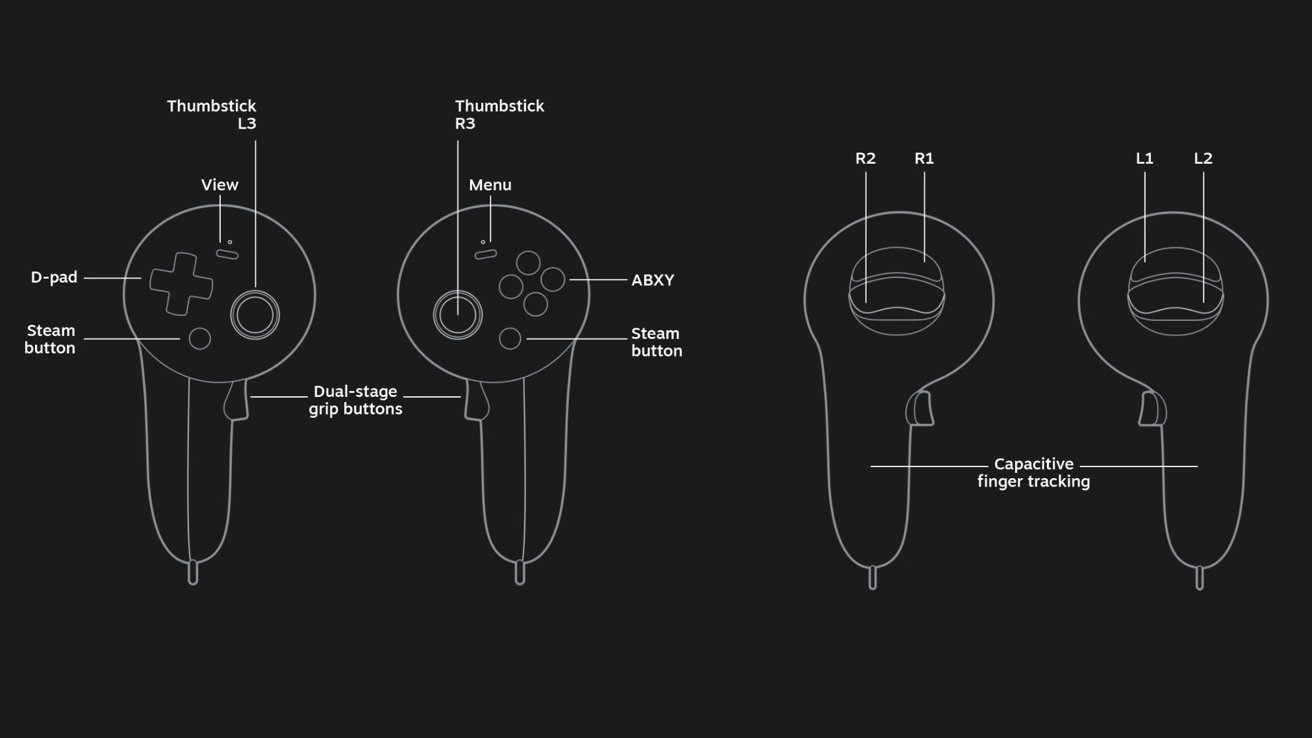
M5 Apple Vision Pro vs. Steam Frame: The left Steam Frame Controller has a D-pad, while the right one offers buttons. Image Credit: Valve/Steam
There is one downside with the Apple Vision Pro, however, as the PSVR2 Sense controller and its charging station are a separate purchase. They’re available from Apple for $249.95 in the United States. That’s on top of the $3500 base price for a 256GB Apple Vision Pro with the M5 chip.
For the Steam Frame, Valve created dedicated Steam Frame Controllers, equipped with full 6-DOF tracking and IMU support. There’s also a haptic motor in each controller, along with support for capacitive finger tracking and capacitive sensing for all input surfaces.
The left Steam Frame controller has a D-pad, while the right one features A, B, X, and Y buttons. According to Valve, both controllers have “all the familiar inputs you need to play non-VR games,” including “thumbsticks, triggers, and bumpers, all right where you’d expect them.” The thumbsticks are described as next-generation magnetic components.
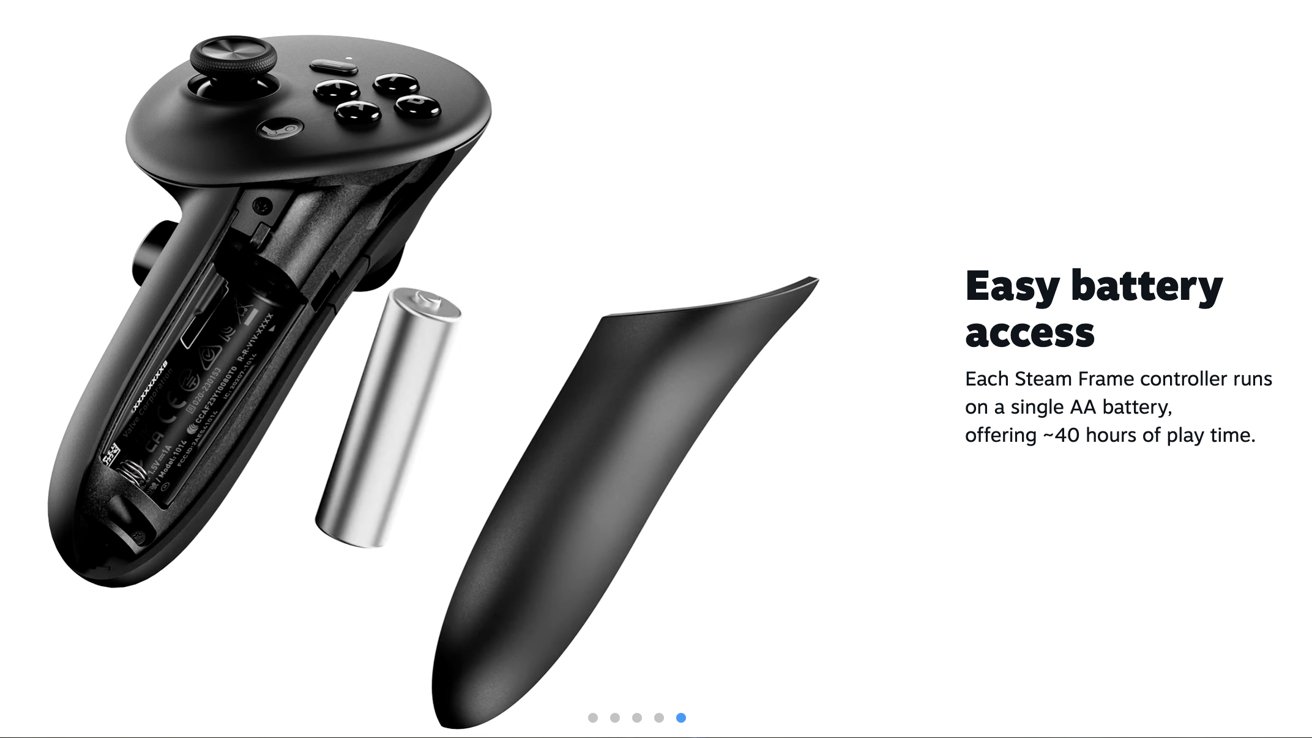
M5 Apple Vision Pro vs. Steam Frame: Each Steam Frame Controller is powered by a removable AA battery, and delivers an estimated 40 hours of play time. Image Credit: Valve/Steam
Each controller is powered by a removable AA battery, delivering an estimated 40 hours of play time, says the Steam Frame product page. Pairing the Steam Frame controllers with the headset is seemingly a straightforward endeavor, and Valve says you’ll even see a virtual Steam Controller floating in your VR space.
Overall, in terms of connectivity and accessory support, there’s no significant difference between the M5 Apple Vision Pro and Steam Frame. The two are not as comparable in the area of hardware performance, however.
M5 Apple Vision Pro vs. Steam Frame: Processing hardware
The new-and-improved 2025 variant of the Apple Vision Pro is powered by the M5 system-on-chip. Valve’s Steam Frame, meanwhile, is equipped with Qualcomm’s Snapdragon 8 Gen 3, announced more than two years ago, in October 2023.
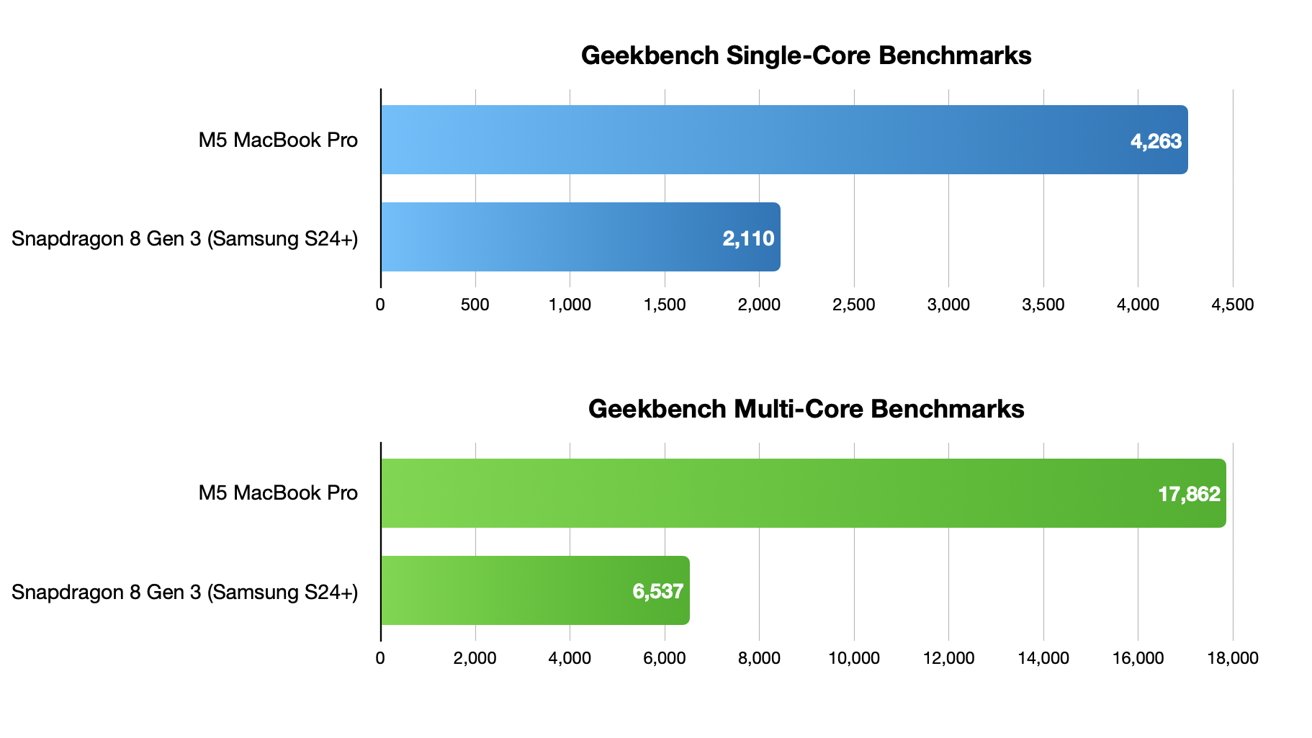
M5 Apple Vision Pro vs. Steam Frame: The M5 chip in the Apple Vision Pro outperforms the Snapdragon 8 Gen 3 in the Steam Frame.
The Snapdragon 8 Gen 3 is not a chip that was specially designed for virtual reality headsets. Instead, the hardware has largely seen use in smartphones, most notably the Samsung S24 range, along with the Samsung Galaxy Z Fold 6, and Samsung Galaxy Z Flip 6.
The processing hardware of the Steam Frame is a surprising two years older than the M5 chip in the Apple Vision Pro. With that in mind, it’s unlikely the two will achieve similar performance in intensive tasks, and performance tests indicate a significant difference between the M5 and Qualcomm’s Snapdragon 8 Gen 3 chip.
To be more specific, Geekbench 6 tests, conducted on the Samsung S24+ with the Snapdragon 8 Gen 3 chip, detail relatively underwhelming results. The Snapdragon 8 Gen 3 received a single-core performance score of just 2,110 points, with a multi-core score of only 6,537 points.
The much newer M5 chip, meanwhile, was able to reach a single-core score of 4,263 points, and a multi-core score of 17,862 points in Geekbench 6. These test results numbers came from the 2025 base model 14-inch MacBook Pro, which uses the same M5 chip as the 2025 Apple Vision Pro.
Overall, the performance scores revealed that the Apple Vision Pro and Valve’s Steam Frame are two completely different beasts, in terms of pure processing power. In short, the Steam Frame likely won’t be able to run hardware-dependent tasks the same way the M5 Apple Vision Pro does.
The M5 system-on-chip in the 2025 Apple Vision Pro is made up of 10 CPU cores and 10 GPU cores, as well as a 16-core Neural Engine. The M5 GPU offers support for hardware-accelerated ray tracing, a feature seemingly not available on Valve’s Steam Frame.
Hardware-accelerated ray tracing allows for detailed lighting effects and shadows. It’s often used in more recent, graphics-intensive games. This means that the M5 Apple Vision Pro is, based purely on the hardware, the better platform for gaming, compared to the Steam Frame.
Both the M5 chip in the Apple Vision Pro and the Snapdragon 8 Gen 3 in the Steam Frame are equipped with 16GB LPDDR5X RAM. They also both have a dedicated Neural Processing Unit, or NPU. Even so, the performance is nowhere near comparable.
The two virtual reality headsets also differ in available storage options, colors, and likely battery life.
M5 Apple Vision Pro vs. Steam Frame: Storage options, pricing, battery life
In terms of storage options, the M5 Apple Vision Pro is available in a 256GB configuration for $3499, as well as a 512GB variant for $3699, and a 1TB model for $3899.
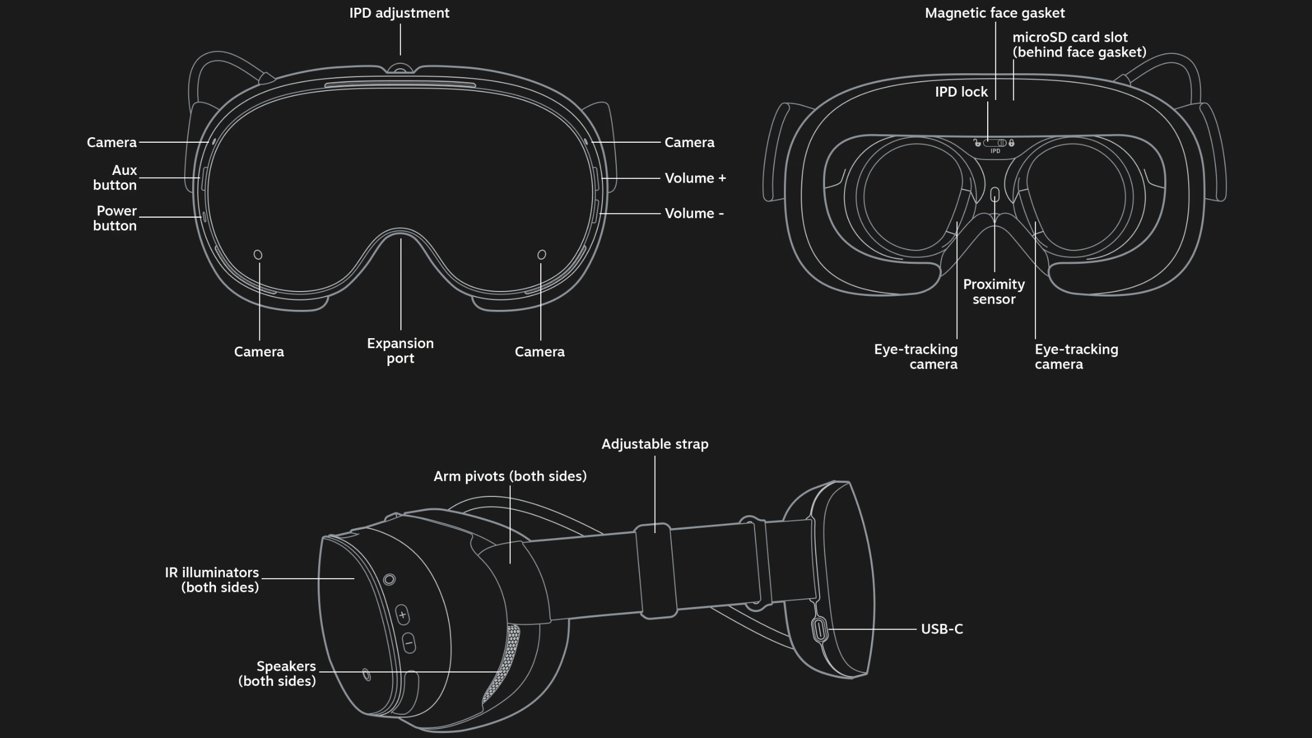
M5 Apple Vision Pro vs. Steam Frame: The Steam Frame is available in 256GB and 1TB storage options. Image Credit: Valve/Steam
The Steam Frame, meanwhile, will be available with either 256GB or 1TB UFS storage options, though the pricing has not yet been disclosed by Valve. What we do know is that the Steam Frame is slated to be priced at under $1000, which is significantly lower than the $3500 256GB Apple Vision Pro with the M5 chip.
Even so, the Steam Frame has an advantage over the M5 Apple Vision Pro, as Valve’s headset features a microSD card slot for expanded storage. This will let users upgrade their storage after the fact, or they can use the SD card slot for file transfer. It’s a neat feature to have, overall.
The device also has a USB-C 2.0 port in the rear, used for charging and data. Valve’s Steam Frame contains a 21.6 Wh lithium-ion battery, which can be charged with a 45W power adapter. For reference, the M5 Apple Vision Pro ships with Apple’s 40W Dynamic Power Adapter with 60W Max.
Additionally, the M5 Apple Vision Pro is offered with an external battery that enables up to 3 hours of video playback. Apple has not disclosed the battery capacity, while Valve has not revealed the expected battery life of the Steam Frame, making a direct comparison somewhat difficult.
The Steam Frame itself will only be available in early 2026, according to Valve. Consequently, there are currently no tear-downs or real-world tests of the new game-focused headset, meaning there’s no data that would allow for an accurate comparison in terms of battery life.
In terms of colors, the Apple Vision Pro has been available only in silver since its introduction in 2023. It appears as though the Steam Frame will similarly only be available in a black or grayish type color.
M5 Apple Vision Pro vs. Steam Frame: Which should you get?
Based on technical specifications alone, the M5 Apple Vision Pro offers a display with better color accuracy, and its advanced camera system offers passthrough in full color. The M5 system-on-chip also supports hardware-accelerated ray tracing, which is especially important for games.

M5 Apple Vision Pro vs. Steam Frame: Valve’s Steam Frame is arguably the better option for gamers, and it’s more affordable. Image Credit: Valve/Steam
However, the pro-level hardware comes at a significant cost. With the lowest possible storage configuration, the M5 Apple Vision Pro is priced at a relatively high $3500 price point. This is the case, in part, because the Apple Vision Pro is a device that has multiple applications.
Some use the Apple Vision Pro as part of their workflow, as a portable personal theater, and as a “spatial computing” device. Apple’s headset offers immersive experiences, lets you play spatial videos, and more. Those features aren’t something the average user will ever really need, though.
The Steam Frame, meanwhile, even with its variant of Arch Linux, is a device with effectively a singular purpose — gaming. In that regard, it’s more akin to a console than a so-called spatial computer. Despite the limited hardware, it’s unlikely that the product will deliver a lackluster gaming experience, given that it was developed by Valve and is compatible with existing Steam games.
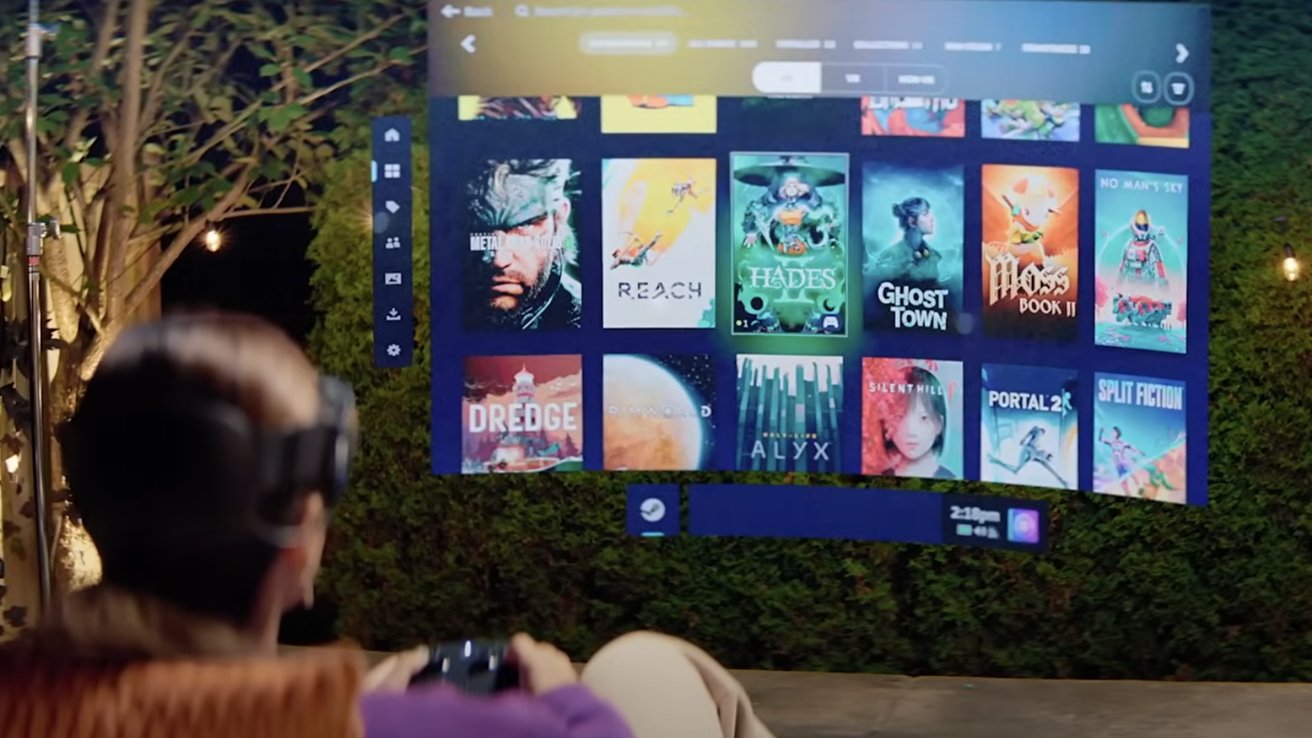
M5 Apple Vision Pro vs. Steam Frame: The Steam Frame will let you play existing Steam games made for PC. Image Credit: Valve/Steam
In short, if you want a multi-purpose virtual reality headset with pro hardware, that works seamlessly with your iPhone, iPad, and Mac, then the Apple Vision Pro will obviously be the right choice for you.
On the other hand, if you’re weary of spending over $3000 on the vague promises of wearable computers, but you happen to be a gamer, the Steam Frame might be the better option, thanks to its lower price point.
Valve has made fully fledged VR games, such as Half-Life: Alyx. The company has also created virtual reality hardware in the past, with the Valve Index being its first attempt.
In any case, the decision boils down to personal preference. You can expect a high-quality experience with either headset, though, in our opinion.
Where to buy the M5 Apple Vision Pro and Steam Frame
The M5 Apple Vision Pro is available to order at the Apple Store, with a starting price of $3,499.
The Steam Frame, meanwhile, is slated to debut in early 2026, with an expected starting price lower than $1000. Valve’s headset is not available for purchase at the time of writing.
Trending Products

Apple iPhone 12 Mini – Parent...
Apple iPhone SE 2nd Gen – Par...

Apple iPhone 7 32GB Unlocked AT&...
Apple iPhone 14 – Parent (Ren...
Apple iPhone 12 Pro Max, PARENT (Re...

Apple iPhone 8 64GB Unlocked –...
Apple iPhone 15 Plus 5G (512GB, 6GB...
Apple iPhone 14 Pro (Renewed)

Apple iPhone 15 Pro Max – Par...
