
The Ugreen NASync iDX6011 Pro AI NAS is overkill for average consumer and small business network storage needs, but its capabilities will be attractive to enthusiasts — even if the AI isn’t great yet.
Over the years, AppleInsider has seen network-attached storage options grow in scope. Effectively a cut-down computer that focused on storage above all else, the format has evolved to bring more utility.
Apps allowed users to do things like run Plex servers or other services on their home network. This was previously in a restrained manner, due to the limitations of the included hardware in most cases.
In more recent releases, this has evolved into including onboard AI capabilities, thanks to the ongoing trend of adding artificial intelligence everywhere. To do this on the local network instead of via a cloud server, you need a decent amount of processing performance that the typical NAS simply doesn’t have.
Ugreen is on a roll with its NAS lineup, and the NASync iDX6011 Pro aims to continue that trend by adding more to the overall NAS package.
There’s maybe too much here for even prosumer-grade workflows.
Ugreen NASync iDX6011 Pro AI NAS review: Physical Design
A typical enclosure for a NAS is an exercise in compact functionality. It’s a device designed to take a bunch of drives and have relatively few other components to include in the package.
This model doesn’t stray far from that mindset, but it is also quite sizable. It’s 13.7 inches wide by 10.2 inches by 8.3 inches, making it a very hefty box.
It has the usual aluminum enclosure, as well as a row of front-facing drive bays, along with some port access towards the base.
Around the back are more ports, a large fan grille, and a power input. That fan section includes a magnetic dust mesh filter, making it simple to clean and remove dust and air buildup from time to time.
The sizable nature comes in because it’s a device capable of taking six physically large hard drives. There’s nothing Ugreen can really do to compensate for the mass of storage you can put into it, but it’s not trying to be ultra-slim with the construction here.
There are, however, two very unusual elements that aren’t usually included in a NAS.
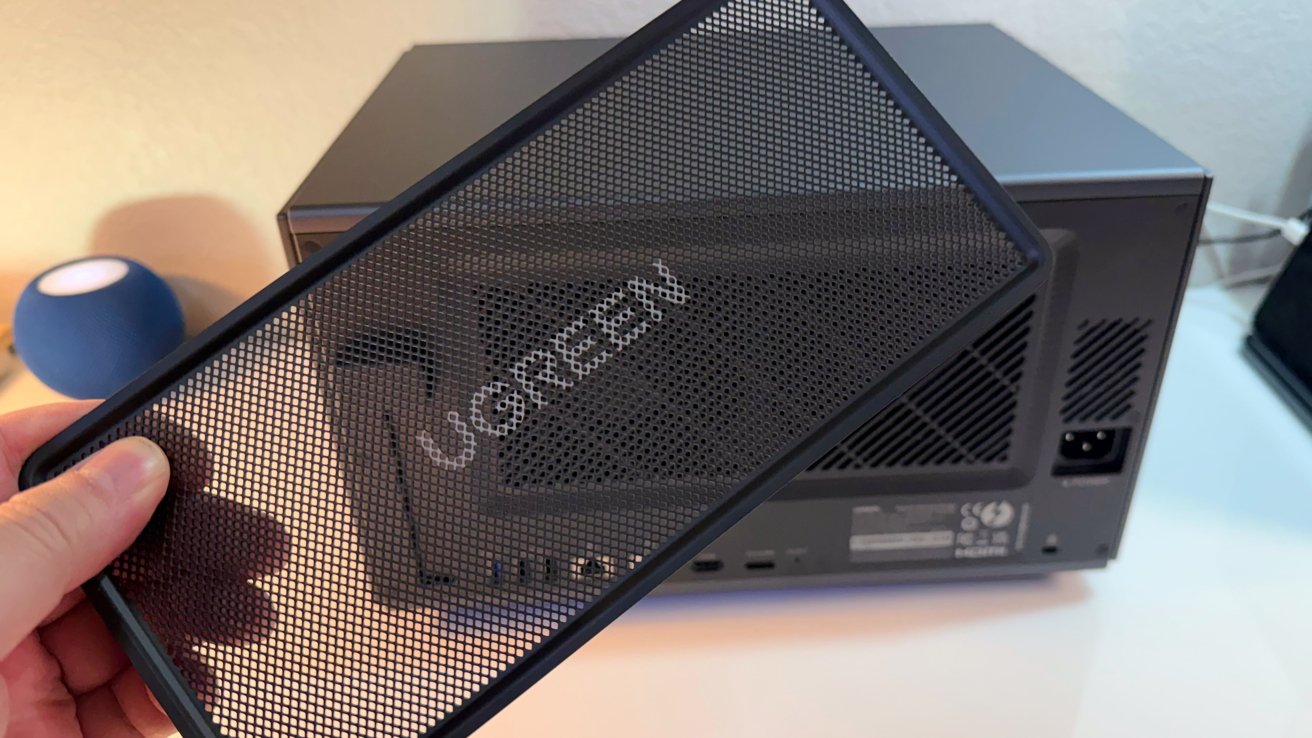
Ugreen NASync iDX6011 Pro NAS review: That’s a massive removable fan grille.
First, there’s a slim touchscreen on the front, accompanying the usual line of drive indicator lights. It’s a 3.7-inch LCD panel that provides immediate access to various stats and settings, like monitoring the CPU and built-in GPT, the NPU, memory usage, network load, and storage usage.
This a neat addition if you’re into monitoring the NAS but don’t want to check the essentials from a web-accessible portal.
The other relative-oddity is the PCIe slot with PCIe Gen4 x8 support. There are a lot of possibilities here, like PCI-E GPU, a fiberchannel card, more ethernet ports, and the like.
Ugreen NASync iDX6011 Pro AI NAS review: Storage
There are six lockable drive bays at the front, numbered from left to right, with trays that can be pulled out for drive installation. These bays are tool-free and hot-swappable, which helps speed up installation and maintenance considerably.
While you can use six SATA drives with it, there are also a pair of M.2 SSD ports inside. These can be set up both as SSD volumes in their own right, separate from the main SATA drive pool, or as an SSD cache for increased speed.
We tested the unit with six 4TB Seagate Red drives provided by Ugreen. We also used four 24TB WD Red Pro, that retail for $688.99 on Amazon.
SSDs used for testing included a pair of Samsung 990 Evo Plus drives, and a pair of Samsung SSD 9100 Pro 1TB drives. You don’t need to use drives this fast. Stick with PCI-E 3.0 drives if you have them, as they’re cheaper, and still provide more than enough speed.
Ugreen says that there’s a maximum capacity of 196TB available, if you can afford and can source sufficiently large-enough drives to meet that level. It says it has verified 30TB drives with the device, and they happen to be the largest to have been tested, but there is the possibility of using higher-capacity models as well.
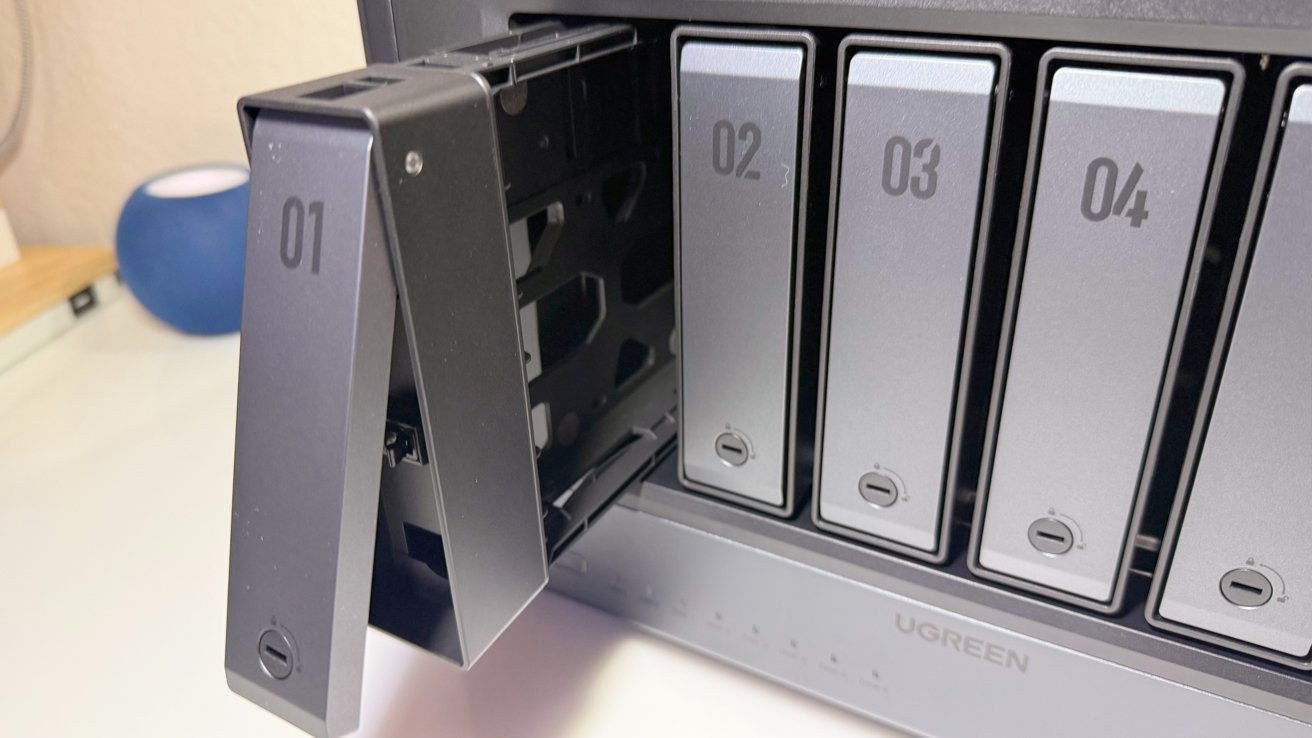
Ugreen NASync iDX6011 Pro NAS review: Cracking open a drive bay.
This isn’t all of the storage, though. There’s also a separate 128GB SSD that is used as the system disk. This is where the applications that can be run on the NAS will be stored.
Your spinning metal drives can formatted as Just a Bunch of Disks (JBOD) as well as RAID 0, RAID 1, RAID 5, RAID 6, and RAID 10. This gives users a lot of options, depending on whether they want to prioritize speed of access or the security of their data.
The UGOS Pro operating system allows users to add more drives to an existing RAID, which is nice. It takes time, and expect this to take a very long time, sometimes days, in the case of RAID 5.
Normally, with just about any NAS, there is also the expectation of storage expansion via the use of other ports on the device, such as Thunderbolt or USB. Aside from the aforementioned PCIe card, which can provide expansion in a few ways, there’s also an OCuLink connection.
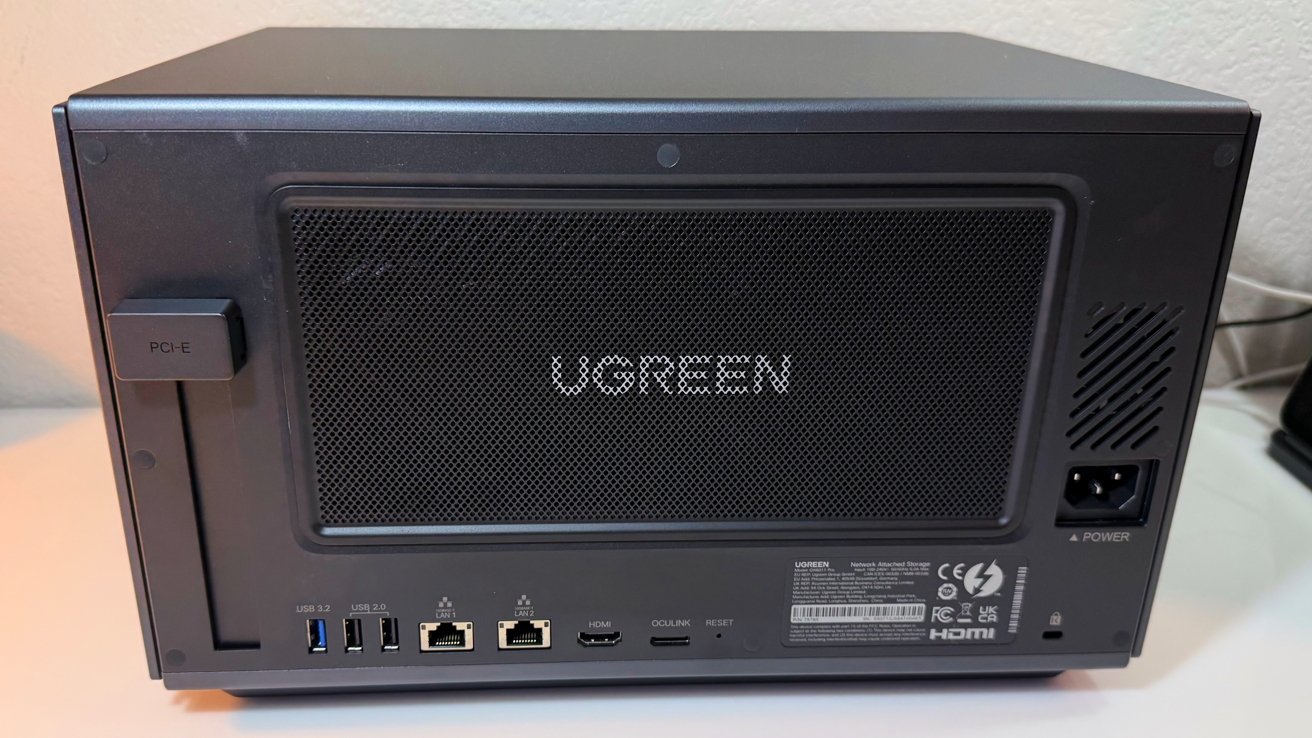
Ugreen NASync iDX6011 Pro NAS review: Rear view, showing the PCIe slot.
This is a high-bandwidth connection that can be used to connect to an external GPU enclosure or other devices. The basic use here is that it could feasibly be used to connect more storage to the NAS itself.
Unfortunately, we weren’t able to test the OcuLink functionality. While I still have some Thunderbolt enclosures kicking around, I do not have any OcuLink, and wasn’t able to secure one in time for the launch of the Kickstarter.
It’s a good idea, though, for future expansion.
Ugreen NASync iDX6011 Pro AI NAS review: Ports and Connectivity
Around the front, there’s a single USB-A 3.2 connection, operating at 10Gbps, as well as an SD 4.0 card slot and a pair of Thunderbolt 4 ports.
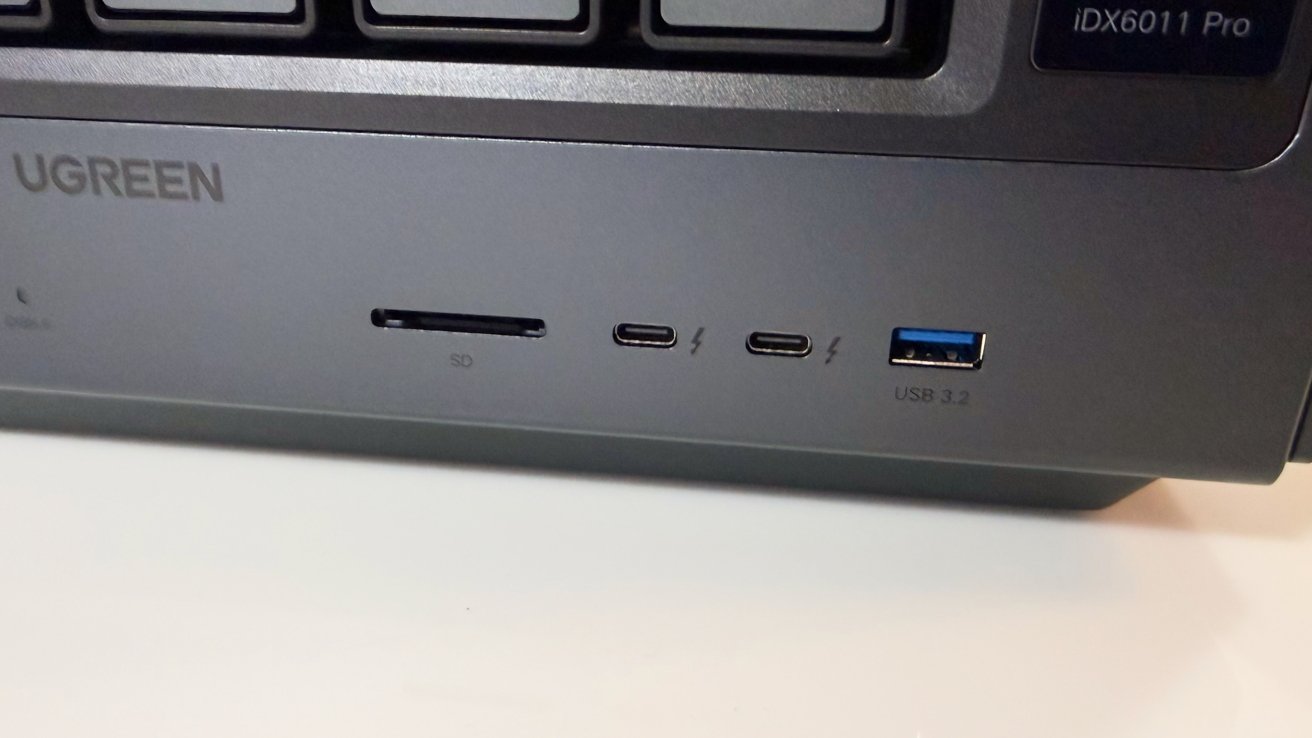
Ugreen NASync iDX6011 Pro NAS review: Front Thunderbolt 4 ports are unusual, but nice to have.
The Thunderbolt 4 ports are primarily intended to ingest data from other drives and store it locally. They can be used to expand storage too, if you need.
You can also use them to network over Thunderbolt with another computer, but only up to as fast as 10 gigabits. To say it plainly, the NASync iDX6011 is not a Drobo desktop replacement, which is unfortunate.
On the read of the unit, there’s the PCIe Gen 4 x8 slot, a second USB-A 3.2 connection, and two more USB 2.0 ports. There’s also an HDMI port that is capable of 8K video, which is useful if you’re running applications from the NAS directly instead of over the network.
The previously-discussed OcuLink port is also in the rear port array.
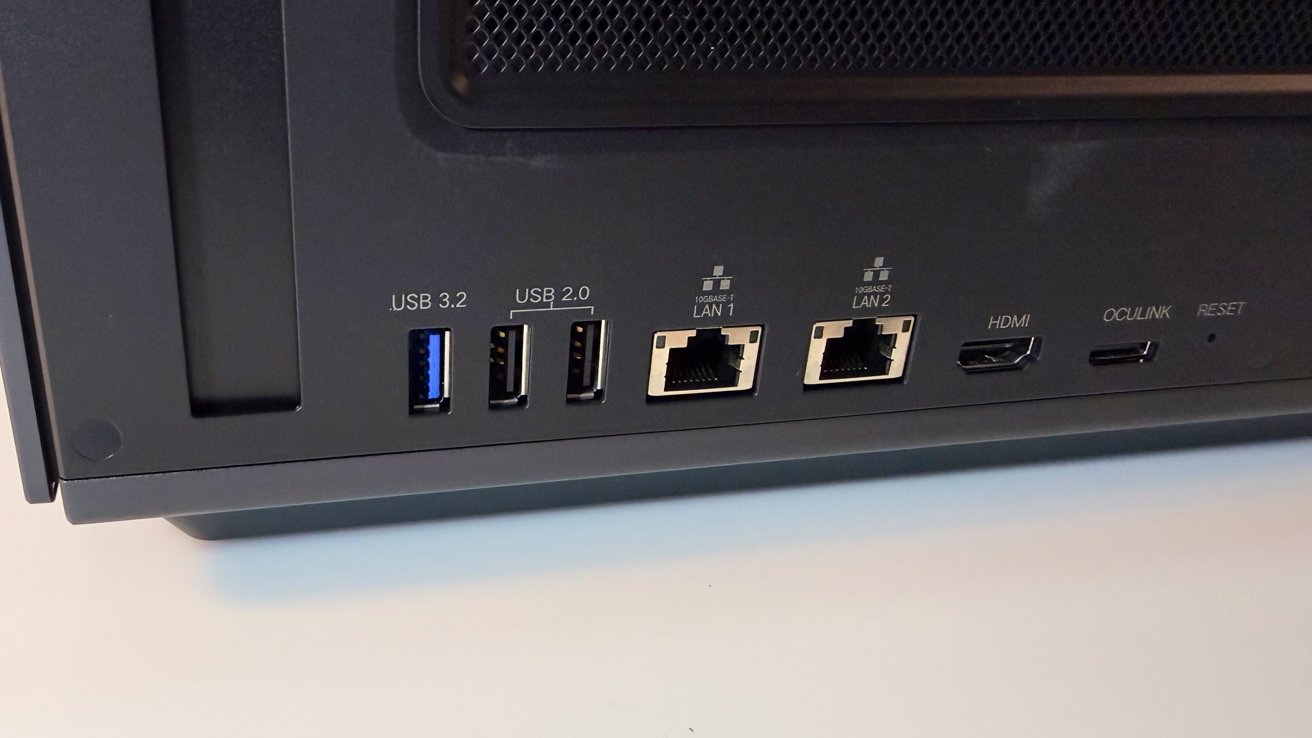
Ugreen NASync iDX6011 Pro NAS review: Rear ports.
Speaking of networking, Ugreen includes a pair of Ethernet connections here. More importantly, they’re 10-gigabit ports, meaning it can have a 20-gigabit connection to your network if you use both of them and have the infrastructure available.
Very few people will have a 10-gigabit network at home, so this isn’t something that most consumers will be able to fully utilize. This is more something for enterprise users who can afford the high-speed network infrastructure, and can possibly use it to its maximum capability.
It is certainly evident that there’s a lot of connectivity potential here, and it’s something that will be very handy for business or enterprise users. For home users, it’s just nice to have the capacity to go higher in the future.
Ugreen NASync iDX6011 Pro AI NAS review: Functionality
It’s one thing to have a lot of storage to play with, but the usual expectation is that the app-usage experience on a NAS is subpar. There’s usually enough performance to get something running, like Plex, but not anything requiring massive amounts of performance.
It’s a very different story with the NASync iDX6011 Pro.
Running the show is the Intel Core Ultra 7 255H, which is far from the usual low-power quad-core CPUs you’d find in a NAS. Instead, this is a 16-core device with six performance cores with a max turbo speed of 5.1GHz, along with eight efficiency cores and two low-power-efficient cores.
It’s still relatively less power-hungry than usual, since it has a base power of 28W and a max turbo power of 115W.
It’s supported by the integrated Intel Arc 140T GPU capable of 74 trillion operations per second, as well as Intel AI Boost. That’s an NPU capable of 13 trillion operations per second, which will help with any AI-related tasks.
To put this into perspective, Geekbench puts the 255H at a single-core score of 2,505 and a multi-core score of 13,327.
On the Apple side, you could get the same multi-core performance from a Mac Studio with an M1 Max, or an iMac with an M4 chip. The single-core performance is about the same as the M2.
Sure, this is Intel and a couple of generations behind Apple’s current generation of Apple Silicon. Having this much power in a NAS opens up all kinds of use cases, assuming you have enough RAM.
Ugreen also includes 64GB of LPDDR5X memory, but unfortunately, it’s not upgradeable. That said, 64GB is a very healthy amount, especially if you’re going to be running applications on it beyond the usual NAS fare.
And run applications you can. It’s running on UGOS Pro as an operating system, which works decently enough after a few years of development at this point. I’d say it’s about 90% of Synology’s offering in this respect.
While it once wasn’t, UGOS Pro is easy to set up, easy to manage, and easy to control access.
The onboard software options are what you’d expect from a typical NAS. You have your private image album library system, your video storage and playback tools, and other productivity-centric items.
If you’re into downloading large files legitimately via Bittorrent, there’s a tool built in for just that, but you can install more if you want.
But, with all of this performance on tap, eventual users may want to do more. Thankfully, there’s Docker support, so you can install an array of different network services on the NAS.
Don’t like Docker? You can also run virtual machines on it instead.
With the performance of the chip used here, those services will be quite fast and snappy. You’re not going to see much of a lag in performance here.
Yes, you can put Plex on there, and there’s full hardware-accelerated 4K transcoding on tap. It can even handle up to 10 concurrent 4K streams, in both direct play and transcoded formats, so long as you have enough clients and network bandwidth.
I do. I tested this, and on a 10-gigabit wired network, I hit 10 4K60 HDR streams to Apple TV units, using Infuse as the playback app, and a direct streams without transcoding. I managed eight when transcoding, which is still incredible.
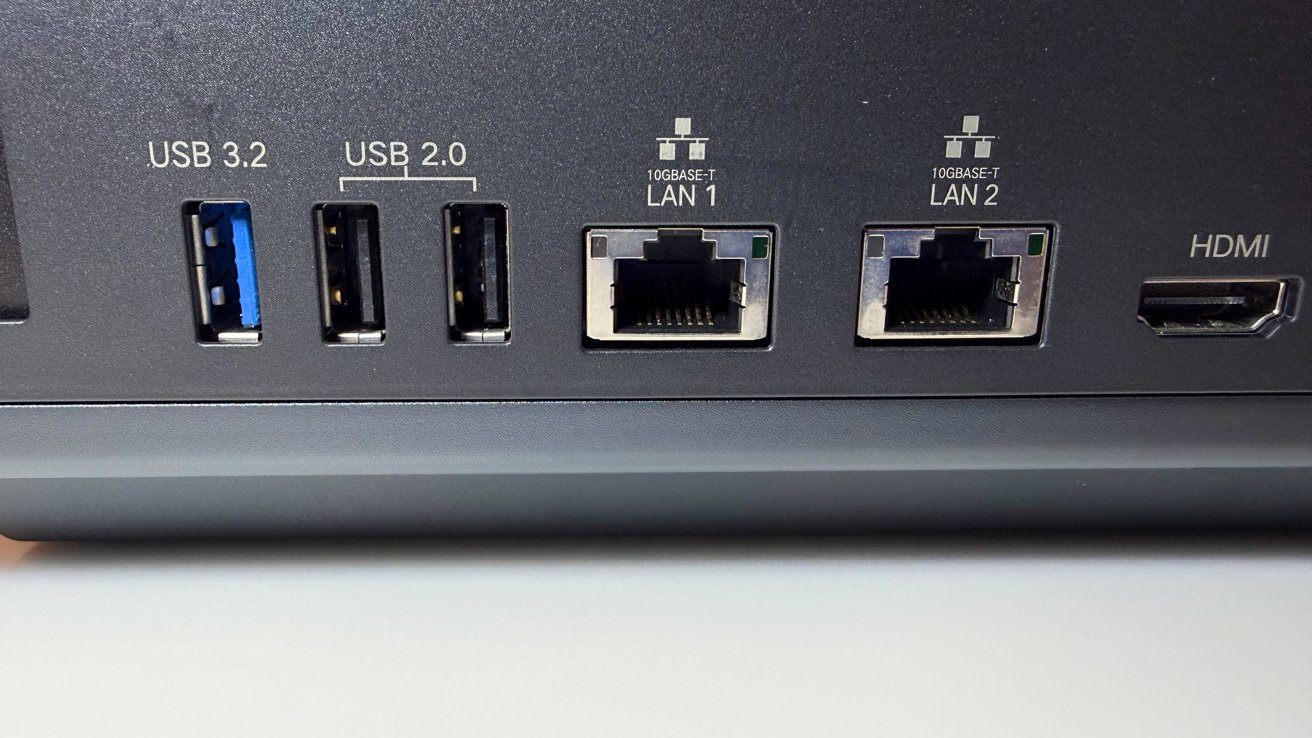
Ugreen NASync iDX6011 Pro NAS review: Bandwidth isn’t a problem here.
Again, this is performance that consumers looking for a home NAS may not necessarily need, but the capability to push the hardware is always there.
On the security side, there are encryption and authentication systems, as well as virus protection with real-time monitoring and automatic updates. Intrusion prevention is provided via its own firewall, complete with DoS protection and detection features.
If you need it for backups, there’s support for Time Machine, though it’s not immediately usable. We’re not going to get into the procedure here, but UGreen has a video about it. The support document is a bit better, though.
Setup lacks the simplicity of the Time Capsule. The speed of the backup and restore will be far slower versus a directly-connected storage device, just like that Time Capsule. It does, however, still work well in this regard.
You can back up using SMB mapping, automated Sync and Backup tasks, transfer over via an external drive, or even take advantage of those Thunderbolt 4 connections for networking, if you want.
Ugreen NASync iDX6011 Pro AI NAS review: A word on AI
A big selling point is Ugreen’s insistence that it has great AI capabilities. In theory, with the choice of chip with its GPU and NPU capabilities, what it does do should be fairly impressive, where on-device AI processing is concerned.
In this instance, it is based around a tool called Uliya. It’s basically the ChatGPT interface that connects to the local language model and to its various functions.
For example, the photo library can be accessed for images based on a prompt, for example, “cats from 2024.” Like Apple Photos and others, it will try to find said cat images from the stored image collection.
There are also other elements like audio transcription. Give it some audio files, and it will create transcripts and mind maps based on what’s said.
Have a lot of files cluttering your storage? It’ll automatically tag your media for you. You could even tell the AI to sort through them, ordering the data based on what it thinks you want, complete with context awareness.
Then there are simple queries that you can ask of the local language model.
A key to this is that it’s all handled on-device, in that the processing happens on the NAS. There is no external connection required for processing, which therefore makes it more private.
This does not work out of the box, nor is it automatic. Users are also not forced to use any of the AI functionality, as they have to be actively downloaded and installed prior to use.
If you’re not going to be needing much speech-to-text transcription, the software driving that experience doesn’t need to be installed in the first place.
That said, there are some limits in terms of what the AI can actually do. You’re not going to get generative AI capabilities here, like image or video generation.
Also, like other AI models, there is always the possibility that it will make mistakes. It will have extensive access to your locally-stored data, but that’s no guarantee that it will create the right result.
It’s fair to say that the more developed AI features, like image recognition, are robust. There’s still a lot more work to be done before the rest of the AI experience catches up with reality.
When we tested this out, we did not see significant network traffic after the install, while the files were being indexed, or when searches were made. We’ll keep an eye on this going forward, though.
AI is down to trust. I do not trust Google and the like to index my data and keep what they learn private, regardless of promises likely made with crossed fingers behind their backs, given historical behavior. I do trust Apple, at least for now.
So, I very much want to turn off the AI features on this device, and I would if the unit were mine to keep forever.
Ugreen NASync iDX6011 Pro AI NAS review: The right kind of overkill
The average home user will have no real need to pick up a Ugreen NASync iDX6011 Pro AI NAS. With an MSRP of $2,599 without drives, or $1,819 or $1,559 under Kickstarter Early-Bird Pricing, it’s an expensive device from the outset.
That aside, it does offer many compelling elements for users with far higher storage needs than usual, and for business users. The capacity and network speed provided here is considerable in a NAS that Ugreen thinks would do well in the home, but really, it surpasses home user needs on practically every level.
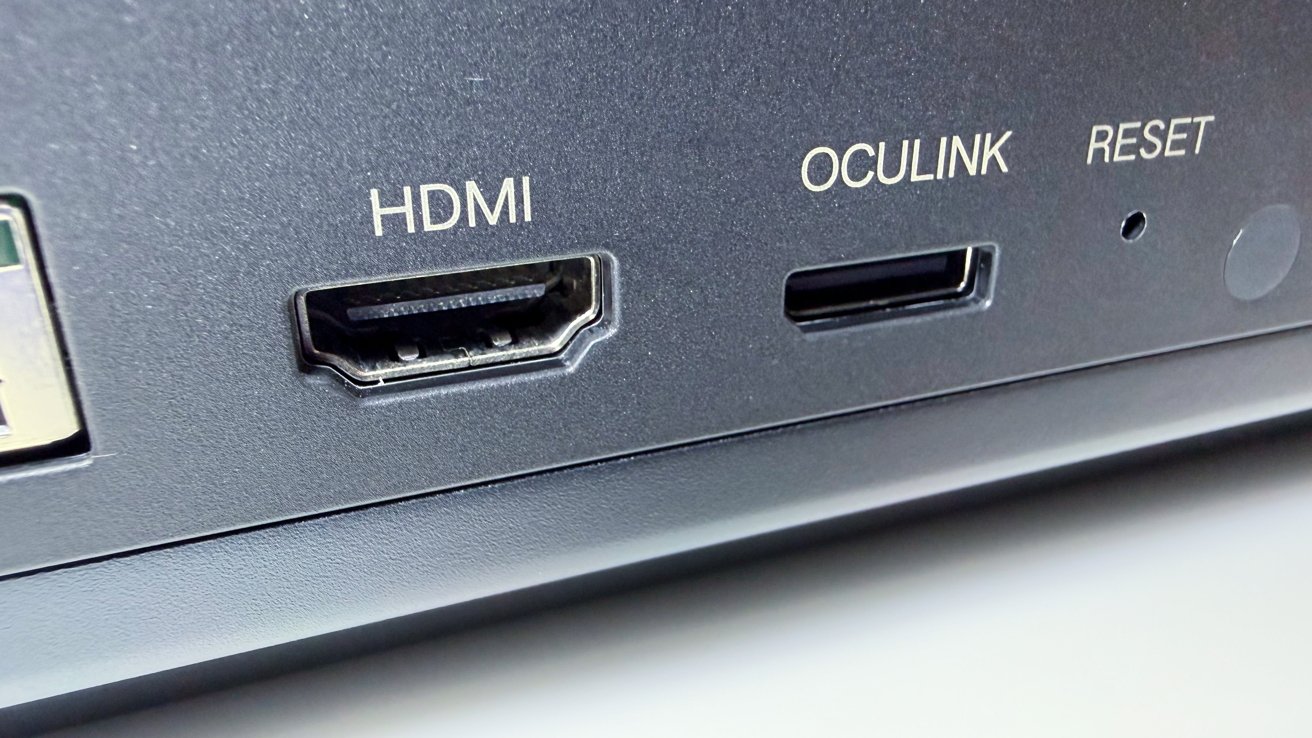
Ugreen NASync iDX6011 Pro NAS review: Oculink is a rarity on a home NAS.
Of course, the AI is a big driving factor here from Ugreen’s marketing. It’s a nice buzzwordy sideshow. That area has some improvements to undergo before it can be deemed really useful, and then there’s the matter of trust, which I talked about earlier.
The bigger draw here is the blistering performance for virtualization. This combination of a high-performance Intel chip and 64GB of memory, albeit fixed in capacity, is more than enough to let multiple network services run on it all of the time.
In essence, the NASync iDX6011 Pro is a desktop-encloded rack-mounted server, with all that entails. For the right consumer or small business, this will certainly fit the bill. You absolutely don’t need it at home, though.
Ugreen NASync iDX6011 Pro AI NAS Pros
- Massive performance
- Storage capacity and connectivity
- Docker support
- PCIe expansion
Ugreen NASync iDX6011 Pro AI NAS Cons
- Flagship AI feature could do with a lot more work
- High sticker price, but it does get you a lot of power
Rating: 4 out of 5
Where to buy the Ugreen NASync iDX6011 Pro AI NAS
The Ugreen NASync iDX6011 Pro is being made available through Kickstarter initially, but Ugreen is taking early reservations before the campaign begins in March. The Super Early Bird Price is $1,599, with the Early Bird price at $1,819. After the campaign, it will have an MSRP of $2,599.
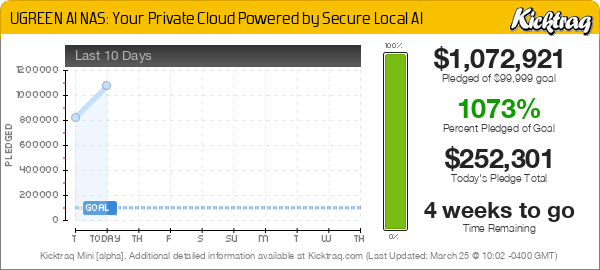
As part of the review, we’ve also incorporated the fact that it’s a crowdfunded project. As a crowdfunded project, there is always the risk of the product not shipping as promised — or at all.
And, there’s been some shenanigans with folks that pre-paid $30 to guarantee a spot — which as it turns out is not guaranteed at all. That’s left a bad taste in our mouth while the preorder period has been going on.
AppleInsider doesn’t cover the majority of crowdfunding efforts as a rule, unless hardware is available and after an assessment of the team behind the effort and their previous releases, if any. We’ve been pretty happy with uGreen, and we’ll see how the preorder $30 deposit situation shakes out.
Trending Products

Apple iPhone 12 Mini – Parent...

Apple iPhone SE 2nd Gen – Par...

Apple iPhone 7 32GB Unlocked AT&...

Apple iPhone 14 – Parent (Ren...

Apple iPhone 12 Pro Max, PARENT (Re...

Apple iPhone 8 64GB Unlocked –...

Apple iPhone 15 Plus 5G (512GB, 6GB...

Apple iPhone 14 Pro (Renewed)

Apple iPhone 15 Pro Max – Par...
